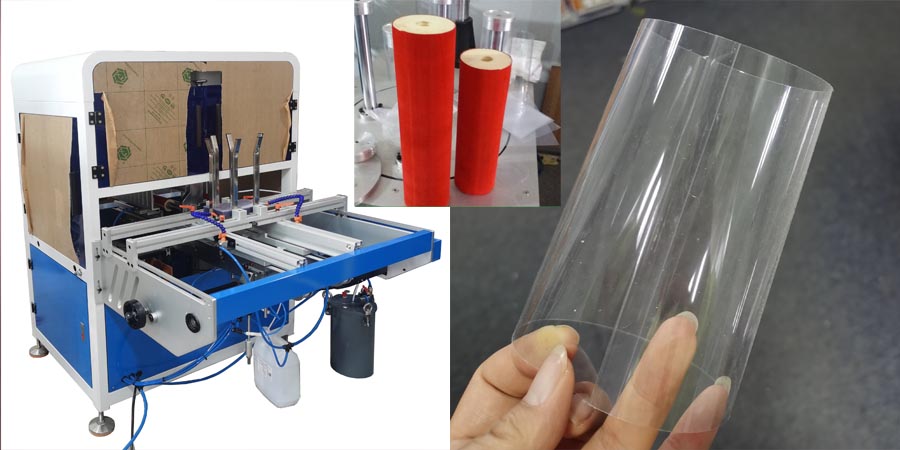
clear poster tube machine Install Video 7-8
Working install video No.7 —adjust plastic sheet feeding tank
- Observe the position of sheet edge
- Take a new plastic sheet and go to back size of clear poster tube machine.
- Loose the outside horizontal guide rod of the material feeding rack. Make sure the distance of horizontal guide rod can just be very little than the size of sheet. Lock screws
- Adjust the position of the vertical feeding guide rod to make the distance between two vertical feeding guide is just a little bigger than the vertical size of plastic sheet
- When adjusting the distance of the vertical guide rod, observe the film that under the mold. Ensure the edge of the file is very close to the inside angle of the vertical guide rod.
- Note: the first/inside horizontal guide rod is the starting rod and can not be moved. Only the screws of fixing the vertical guide rod can be loosened
- Both horizontal guide rods are marked with numerical values. When moving the vertical guide rod, ensure the number values at the intersection of the vertical and horizontal guide roads are consistent. This will ensure the vertical guide rod does not incline.
Working install video No.8— vertical feeding guide rod position
- Check there is a plastic sheet under the mold. (no need to open glue right now)
- Press the following control bottom in the order: “Molding Positioning”—>”Upper Molding Pressure”—>”Side Molding Pressure”—>”Lower Molding Pressure”
- Goes to the front of the machine to observe the overlapping position of the sheet
- Make sure the overlapping position is under “the hot pressureplate”
- Start to adjust the positionof the Discharge Clamps of clear poster tube machine
- At the beginning we already moved the discharge clamps to the size of machine
- Press the right / left moving direction icon to move is close to the mold
- Observe its position relative to the mold feeding groove and just the position of it.
- Make sure the discharge clamps could be easily insert into the mold feeding groove